
Panic Flight for Google TV1.3.5 - Google Play
You'll be able to see results in few seconds.
Publisher Description
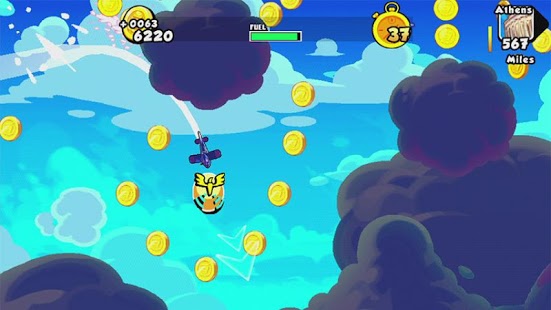
Panic Flight for Google TV takes you on an endless adventure on big screen where your reflexes are put to the ultimate test! As a pilot of the AMA Airlines fleet, you must fly as far as possible and transport your passengers safely to their destination. But be careful! Obstacles such as tornados and UFOs with destructive desires will do everything in their power to stop you. Choose and upgrade your planes to fly at your convenience. Travel the globe on solo missions or show the whole world how well you can fly on the infinite flight.
The Panic Flight team wish you an enjoyable flight and invite you to check out the Panic Flight Facebook page to stay up to date with the latest planned content updates.
Prepare for takeoff!
Features:
• 10 planes with unique features and multiple upgrades.
• Solo campaign mode: 21 missions, in-game quests and mini-missions.
• "Infinite flight" mode with score sharing via Facebook and Twitter.
You can discover a greater gameplay experience on your HD TV thanks to MHL technology. Visit http://meetmhl.com/ to find out more.
Like us on Facebook and follow us on Twitter to get the latest news on our games, contests and more!
Official site: http://www.amamobile.com
Facebook: http://www.facebook.com/AMAmobile
Facebook: http://www.facebook.com/PanicFlight
Twitter: http://twitter.com/AMobileA
YouTube: http://www.youtube.com/amamobile
About Panic Flight for Google TV
The company that develops Panic Flight for Google TV is AMA LTD.. The latest version released by its developer is 1.3.5.
To install Panic Flight for Google TV on your Android device, just click the green Continue To App button above to start the installation process. The app is listed on our website since 2014-01-09 and was downloaded 0 times. We have already checked if the download link is safe, however for your own protection we recommend that you scan the downloaded app with your antivirus. Your antivirus may detect the Panic Flight for Google TV as malware as malware if the download link to com.Ama.PanicFlightFreeTv is broken.
How to install Panic Flight for Google TV on your Android device:
- Click on the Continue To App button on our website. This will redirect you to Google Play.
- Once the Panic Flight for Google TV is shown in the Google Play listing of your Android device, you can start its download and installation. Tap on the Install button located below the search bar and to the right of the app icon.
- A pop-up window with the permissions required by Panic Flight for Google TV will be shown. Click on Accept to continue the process.
- Panic Flight for Google TV will be downloaded onto your device, displaying a progress. Once the download completes, the installation will start and you'll get a notification after the installation is finished.
Program Details
System requirements
Download information
Pricing
Version History
version 1.3.5
posted on 2014-01-09
version 1.3.5
posted on 2013-04-25
Several fixes and updates
Disclaimer
Official Google Play Link
We do not host Panic Flight for Google TV on our servers. We did not scan it for viruses, adware, spyware or other type of malware. This app is hosted by Google and passed their terms and conditions to be listed there. We recommend caution when installing it.
The Google Play link for Panic Flight for Google TV is provided to you by apps112.com without any warranties, representations or guarantees of any kind, so access it at your own risk.
If you have questions regarding this particular app contact the publisher directly. For questions about the functionalities of apps112.com contact us.
